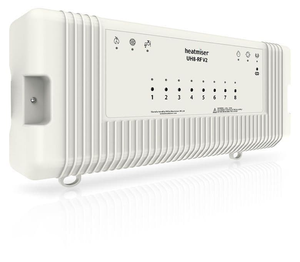
Heatmiser - UH8-RF Wiring Centre

Avaliações de Heatmiser - UH8-RF Wiring Centre

A classificação por estrelas de um produto é calculada como a média de todas as suas avaliações.


logotipo da Fastwarm Underfloor Heating

Vendido por Fastwarm Underfloor Heating

www.fastwarm.com

•

3,5 mil Avaliações

4,9

As informações nessa página são baseadas exclusivamente em avaliações do produto escritas por clientes de Fastwarm Underfloor Heating via Trustpilot.


Aqui está o que as pessoas destacaram

Facilidade de instalação

4,9

8 avaliações

Desempenho

4,9

8 avaliações

Qualidade

4,9

8 avaliações

Confiabilidade

5,0

8 avaliações

Custo-benefício

5,0

8 avaliações


Detalhes do produto

  • Marca: Fastwarm
  • GTIN: 5060908623911
  • MPN: UH8-RF

Todas as avaliações


Avaliado com 5 de um total de 5 estrelas

I've replaced my 20yo Rehau system with this Heatmiser UH8 RF system - had to be wireless because my Rehau room stats are LV 2 core wired, I can't replace the wires in 14 rooms. I've DIY installed 2 of these, upstairs and downstairs, a great piece of kit. Quite straightforward tbh. Fix on wall, connect mains, connect actuators - it has a marvellous "test dip switch" feature that allows you to test everything - Pump, Heat Call, Each Actuator Zone. Once actuators look ok, fit them on manifold, of course make a note of zone/manifold zone. Then, using the NeoAir thermostats, pair each stat against the chosen zone. Easy. Then, install the NeoHub to your router/LAN - this enables online control via the NeoApp. Download and install the NeoApp. Then, pair each NeoAIr stat to the NeoHub using the NeoApp.This allows you to control each stat via the app. I discovered 3 stats furthest away from my NeoHub kept dropping 'Offline'. This was due to distance/walls to the NeoHub. The stats still controlled the UH8 zones, BUT couldn't connect to the NeoHub. Solution - Neo Boost V2 repeater... Pair the Boost V2 to the NeoHub physically near the NeoHub pressing a button. Then, pair to the NeoApp by adding the repeater to the NeoApp. Then, reset each affected NeoAir and re-pair to the NeoHub using the app Then, locate the Boost opposite end of property and the nearby stats will connect and work fine.

Facilidade de instalação: 5
Desempenho: 5
Qualidade: 5
Confiabilidade: 5
Custo-benefício: 5
Avaliado com 5 de um total de 5 estrelas

easy to use and turn on the heating to the areas wanted. just push the button on the front.

Facilidade de instalação: 5
Desempenho: 5
Qualidade: 5
Confiabilidade: 5
Custo-benefício: 5
Avaliado com 5 de um total de 5 estrelas

Very good

Facilidade de instalação: 5
Desempenho: 5
Qualidade: 5
Confiabilidade: 5
Custo-benefício: 5
Avaliado com 5 de um total de 5 estrelas

Thank you!

Facilidade de instalação: 5
Desempenho: 5
Qualidade: 5
Confiabilidade: 5
Custo-benefício: 5
Avaliado com 5 de um total de 5 estrelas

So easy to use a child could do it

Facilidade de instalação: 5
Desempenho: 5
Qualidade: 5
Confiabilidade: 5
Custo-benefício: 5
Avaliado com 5 de um total de 5 estrelas

No Issues our end

Facilidade de instalação: 5
Desempenho: 5
Qualidade: 5
Confiabilidade: 5
Custo-benefício: 5
Avaliado com 5 de um total de 5 estrelas

Performs well and says what it does on the tin

Facilidade de instalação: 5
Desempenho: 5
Qualidade: 5
Confiabilidade: 5
Custo-benefício: 5
Avaliado com 4 de um total de 5 estrelas

Only issue I had was the terminal screws had to be fully unscrewed and pushed opened before the wires would terminate properly

Facilidade de instalação: 4
Desempenho: 4
Qualidade: 4
Confiabilidade: 5
Custo-benefício: 5
logotipo da Fastwarm Underfloor Heating

Resposta da Fastwarm Underfloor Heating

Good afternoon, Bob

Thank you for taking time to leave feedback, I will pass this information onto the relevant team.

Kind Regards
Lacey at Fastwarm.